
Plans & Billing
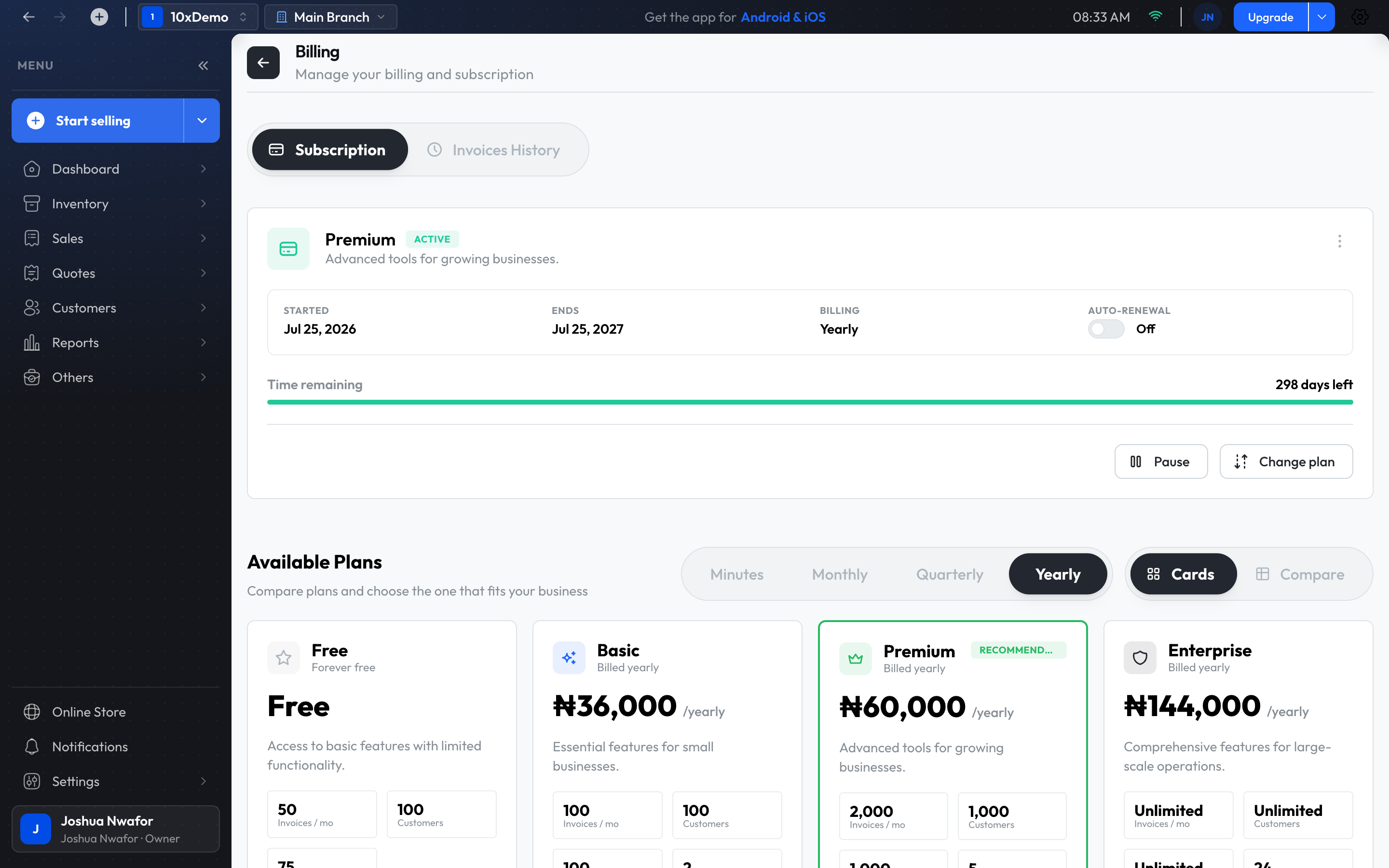
ShopkeeperPOS has four plans: Free, Basic, Premium and Enterprise. Each branch has its own subscription.
- Where to find it
- Subscription button (top of the app)Manage Plan
- Who can use it
- Only the owner can change the subscription.
What each plan adds
- Free: selling, customers, expenses and inventory.
- Basic: adds quotes, returns, credit notes and team members.
- Premium: adds credit sales, customer wallets, variants, serial numbers, units of measure, expiry dates, stock takes and transfers, several branches, split payments, taxes and discounts, and advanced reports.
- Enterprise: everything in Premium, with the highest limits, for larger businesses.
The free trial
New businesses start with a free trial. While it runs, the subscription button shows Trial and the date under Trial Ends.
When the free allowance runs out, the app shows Free Trial Limit Reached when you try to record a sale, and some screens show Subscription Required. Choose View Subscription Plans and pick a plan to carry on. Your data stays as it is.
Open Billing
- Click the subscription button at the top of the app. It reads Subscribe, Upgrade or Reactivate.
- Or point at the arrow beside it and choose Manage Plan or Choose Plan.
The Billing screen has two tabs: Subscription and Invoices History.
Choose a plan
- Under Available Plans, pick how often you want to pay. Plans can be billed monthly, quarterly or yearly.
- Compare the plans. Cards shows one card per plan; Compare puts them side by side.
- On the plan you want, choose Subscribe, Start … trial or Switch to this plan.
- Pay in the window that opens.
Switch plan
Choose Switch to this plan on another plan, or Change plan on your current subscription, then Confirm Switch. The new plan takes effect immediately, and a new billing period starts from that day.
Your subscription
The subscription card shows its status (Active, Trial, Pending payment, Paused, Cancelled or Expired), when it started, the next billing date, the amount, whether it renews automatically, and the days left.
- Pay now or Complete payment: pay for a subscription that is waiting for payment.
- Renew now: renew before or after it expires.
- Pause and Resume.
- Cancel subscription: asks for a reason, then Yes, cancel subscription.
Important
Past payments
Invoices History lists every subscription invoice with its date, amount and status. Use Pay on an unpaid one, View details, or Download PDF for your records.
Branches and plans
Each branch has its own subscription, so a feature can be available in one branch and not in another. Check the subscription button after switching branch.
Related
Still stuck? Contact support.